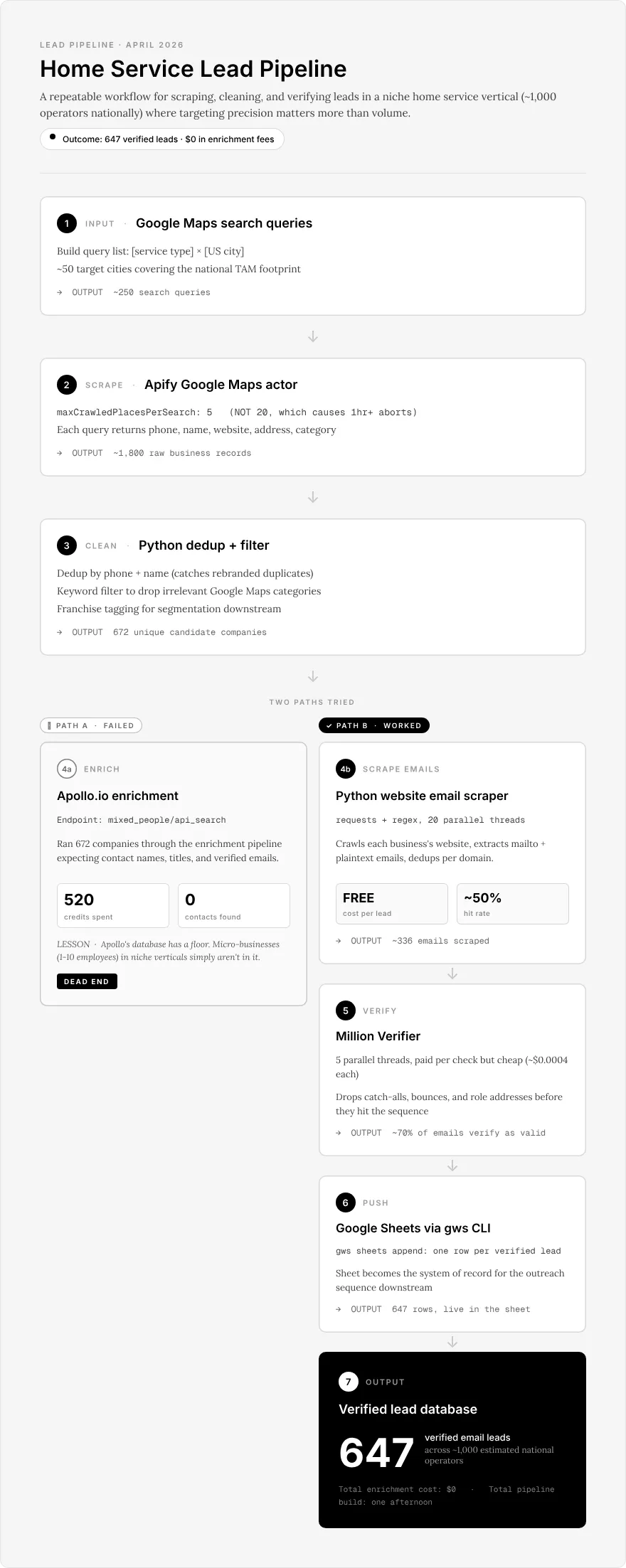
672 companies. 520 Apollo credits. 0 contacts. Then one afternoon of Python and regex produced 647 verified leads. Here’s the full pipeline, with code you can steal.
I had a national TAM of around 1,000 operators and a 95% accuracy floor. Cold email providers pause campaigns the moment bounce rate tops 5%, so anything dirtier than 95% valid addresses was going to stall the whole run on day three. Apollo’s 0% hit rate wasn’t annoying. It was a blocker.
Here’s the math. I was building an outbound list for a client in a niche home service vertical where the entire national universe fits on a single spreadsheet tab. About 1,000 operators, mostly owner-run, mostly with websites that look like they were built in 2014 by a nephew. The pitch required me to walk in knowing who each operator was and how to reach them. A lead list that was 50% wrong wouldn’t cost me a little credibility. It would cost me the whole engagement.
So I built Apollo into the pipeline. It’s the industry default. Fast, clean UI, and for the 80% of outbound use cases where you’re selling to mid-market B2B with LinkedIn profiles and corporate email domains, it’s the right tool. I’ve used it on dozens of projects. I’ll use it again tomorrow.
The Apollo stage
At first the pipeline looked like this: Apify Google Maps pulls the companies, Apollo’s mixed_people/api_search endpoint enriches each domain with a decision-maker (Owner, Founder, General Manager, Operations Manager), Million Verifier checks the emails, a Google Sheet catches the results. Four stages, all of them battle-tested on previous projects.
I fed it 672 companies after dedup.
520 Apollo credits later, the enrichment stage had returned zero contacts.
Not “a few.” Not “mostly junk.” Zero. I stared at the empty column, clicked refresh in case the API was lying, then looked at the raw responses. Apollo had the company entries. It knew the domains existed. It just had no people attached. The database was blank in the places that mattered.
This is the thing Apollo’s marketing doesn’t tell you. The data is great where LinkedIn is strong. Owner-operated home service businesses are not on LinkedIn. Their owners are on Facebook, at a trade show, or at the shop. Apollo’s contact graph has a specific shape, and that shape is “people who are employed and say so on the internet.” If your TAM lives outside that shape, you’re paying for access to a database that does not contain your leads.
I ripped the Apollo stage out of the pipeline.
Then I opened one of the company websites. The contact email was on the homepage, in plain text, in a footer block. I opened another. Same thing. I opened a third. Same thing.
Apollo had been charging me for data I could read with my eyes.
The replacement pipeline
Four stages. Built in one afternoon. One Python dependency (requests). Free except for the Million Verifier credits I already had.
Stage 1: Apify Google Maps
The client list was decent but I wanted a second source to catch anything missing. Apify’s compass/crawler-google-places actor handles it with one critical parameter.
import requests
APIFY_TOKEN = "your_apify_token"GMAPS_ACTOR = "compass~crawler-google-places"
SEARCH_TERMS = [    "your niche service term",    "your niche service synonym",]
METROS = [    "Seattle, WA", "Denver, CO", "Austin, TX", "Phoenix, AZ", "Charlotte, NC",    # ...add your target metros]
queries = [f"{term} near {metro}" for term in SEARCH_TERMS for metro in METROS]
run_input = {    "searchStringsArray": queries,    "maxCrawledPlacesPerSearch": 5,  # 20 triggered 20k-page crawls; 5 is the safe cap    "language": "en",    "countryCode": "us",    "skipClosedPlaces": True,}
resp = requests.post(    f"https://api.apify.com/v2/acts/{GMAPS_ACTOR}/runs?token={APIFY_TOKEN}",    json=run_input,    headers={"Content-Type": "application/json"},)run_id = resp.json()["data"]["id"]print(f"Apify run started: {run_id}")
maxCrawledPlacesPerSearch: 5. That’s the setting that keeps Apify from turning a $3 test run into a $40 surprise. A previous version used 20 and ended up trying to crawl 20,000 pages overnight before it aborted. Five is the cap I’ve settled on for any niche-vertical job. Dry-run one query first. Then fan out.
Stage 2: Clean and filter
Load the JSON from Apify, dedupe by domain, drop rows without URLs, filter against a keyword list so you’re not burning scraper time on chain hardware stores and city government pages that sneak into Google Maps results. The whole stage is about fifteen lines:
import json
KEYWORDS = ["your", "niche", "vertical", "terms"]
with open("apify_results.json") as f:    raw = json.load(f)
seen, cleaned = set(), []for row in raw:    domain = (row.get("website") or "").lower().replace("www.", "").strip("/")    combined = f"{row.get('title', '')} {row.get('categoryName', '')} {domain}".lower()    if not domain or domain in seen or not any(k in combined for k in KEYWORDS):        continue    seen.add(domain)    cleaned.append(row)
with open("cleaned.json", "w") as f:    json.dump(cleaned, f)
Skip this step and you’ll end up politely cold-emailing a municipal recycling department.
Stage 3: The email scraper
This is the stage that replaced Apollo. One file, one dependency, network-bound. Runs in under ten minutes on a few hundred domains.
#!/usr/bin/env python3"""Scrape emails from a CSV of company websites.
Hits the homepage plus six common contact-page paths for each domain,extracts every email via regex, filters out common junk patterns, andwrites results to a new CSV as each row completes.
Usage:    python scrape_emails.py input.csv output.csv    python scrape_emails.py input.csv output.csv --workers 20 --timeout 8"""import argparseimport csvimport reimport sysfrom concurrent.futures import ThreadPoolExecutor, as_completed
import requests
PAGES = ["", "contact", "about", "contact-us", "about-us", "team", "our-story"]
EMAIL_RE = re.compile(r"[a-zA-Z0-9._%+-]+@[a-zA-Z0-9.-]+\.[a-zA-Z]{2,}")
JUNK_PATTERNS = [    "sentry", "webpack", "example.com", "wixpress", "wix.com", "wordpress",    ".png", ".jpg", ".gif", ".svg",    "schema.org", "w3.org", "fonts.com", "latofonts", "gravatar", "developer.",    "yoursite", "yourdomain", "email@", "name@", "info@example",    "test@", "change.me",]
HEADERS = {    "User-Agent": (        "Mozilla/5.0 (Macintosh; Intel Mac OS X 10_15_7) "        "AppleWebKit/537.36 (KHTML, like Gecko) "        "Chrome/131.0.0.0 Safari/537.36"    )}

def normalize_url(url):    """Ensure URL has a scheme and no trailing slash."""    url = url.strip()    if not url.startswith(("http://", "https://")):        url = "https://" + url    return url.rstrip("/")

def extract_emails(url, timeout):    """Fetch one URL and return the set of clean email addresses found in its HTML."""    found = set()    try:        resp = requests.get(url, timeout=timeout, headers=HEADERS, allow_redirects=True)        if resp.status_code != 200:            return found    except requests.RequestException:        return found
    for match in EMAIL_RE.findall(resp.text):        email = match.lower().strip(".")        if len(email) >= 60:            continue        if any(junk in email for junk in JUNK_PATTERNS):            continue        found.add(email)    return found

def scrape_company(website, timeout):    """Hit all known contact pages for a domain and collect every email found."""    base = normalize_url(website)    all_emails = set()    for path in PAGES:        url = f"{base}/{path}" if path else base        all_emails |= extract_emails(url, timeout)    return all_emails

def run(input_path, output_path, workers, timeout):    with open(input_path, newline="") as f:        rows = [r for r in csv.DictReader(f) if r.get("website")]
    if not rows:        sys.exit("ERROR: input CSV must have a 'website' column with at least one value")
    print(f"Scraping {len(rows)} companies with {workers} workers...")    fieldnames = list(rows[0].keys()) + ["emails_found", "email_count"]
    hit = 0    with open(output_path, "w", newline="") as out:        writer = csv.DictWriter(out, fieldnames=fieldnames)        writer.writeheader()
        with ThreadPoolExecutor(max_workers=workers) as pool:            futures = {pool.submit(scrape_company, r["website"], timeout): r for r in rows}            for i, future in enumerate(as_completed(futures), 1):                row = futures[future]                emails = future.result()                row["emails_found"] = "; ".join(sorted(emails))                row["email_count"] = len(emails)                writer.writerow(row)                out.flush()                if emails:                    hit += 1                if i % 25 == 0:                    print(f"  {i}/{len(rows)} done ({hit} with emails)")
    pct = hit * 100 // len(rows)    print(f"\nDone. {hit}/{len(rows)} had at least one email ({pct}%)")    print(f"Saved: {output_path}")

def main():    parser = argparse.ArgumentParser(description=__doc__)    parser.add_argument("input", help="Input CSV path (must have a 'website' column)")    parser.add_argument("output", help="Output CSV path")    parser.add_argument("--workers", type=int, default=20, help="Concurrent threads (default: 20)")    parser.add_argument("--timeout", type=int, default=8, help="Request timeout in seconds (default: 8)")    args = parser.parse_args()    run(args.input, args.output, args.workers, args.timeout)

if __name__ == "__main__":    main()
Full repo: The scraper and the Million Verifier wrapper live at github.com/xdylanbaker/google-maps-email-scraper under an MIT license. Clone it, steal it, tweak it for your vertical. PRs welcome.
The load-bearing detail is the PAGES list. Most scrapers hit the homepage and quit. About half the companies in this vertical put their email on /contact or /about instead of the root, so homepage-only would have left a couple hundred leads on the floor. Seven paths catches the ones a homepage misses and overkills the ones it doesn’t.
The JUNK_PATTERNS list is the other receipt. It grew one entry at a time over the afternoon as new flavors of garbage showed up in the output. latofonts@ was a fun one. Every pattern on that list exists because something matched the naive regex that I very much did not want in a cold email list.
Hit rate: 50% on 672 companies — 336 with at least one email on a contact page. Each of those pages averaged two or three clean addresses (the owner@, info@, billing@ pattern most contact pages follow), so the pool going into verification was closer to 900 raw emails across 336 distinct companies.
The other 50% of the list fell into three buckets. Wix and Squarespace sites that render contact info in JavaScript the requests library never sees. Cloudflare-gated sites that 403 on a bare requests user-agent. And sites where the owner genuinely doesn’t put email anywhere, only a phone number or a contact form with no mailto. For those, phone-based outreach is the fallback, and the 50% miss rate is the tax you pay for keeping this pipeline free.
Stage 4: Million Verifier and Google Sheets
You cannot send cold email to unverified scraped addresses. The bounce rate will quarantine the sending domain inside 48 hours. Million Verifier is the one stage in the pipeline that costs real money, and it costs roughly 50 cents for 647 checks.
import requestsfrom concurrent.futures import ThreadPoolExecutor, as_completed
MV_API_KEY = "your_million_verifier_key"

def verify_email(email):    """Check one email. Returns 'good', 'risky', 'bad', 'unknown', or 'error'."""    try:        resp = requests.get(            "https://api.millionverifier.com/api/v3/",            params={"api": MV_API_KEY, "email": email, "timeout": 15},            timeout=30,        )        resp.raise_for_status()        return resp.json().get("quality", "unknown")    except requests.RequestException:        return "error"

def verify_all(emails, workers=5):    """Verify a list of emails in parallel. Returns {email: quality}."""    results = {}    with ThreadPoolExecutor(max_workers=workers) as pool:        futures = {pool.submit(verify_email, e): e for e in emails}        for future in as_completed(futures):            email = futures[future]            results[email] = future.result()    return results
About 70% came back good. The rest were catch-alls, role addresses, or dead domains. From there the survivors go into a Google Sheet via gspread and OAuth, which is boring enough to skip here.
672 companies in. 336 with contact pages. 647 verified email addresses out.
What this actually costs
The replacement pipeline cost Million Verifier pennies, Apify about $2 for the supplementary Google Maps pull, and one afternoon. Apollo burned 520 credits returning zero contacts.
Your mileage will vary. If your TAM is 50,000 SaaS decision-makers, Apollo is still the right answer and regex is a waste of time. This post is not “Apollo is bad.” Apollo is very good at what it’s good at.
This post is: if you’re working in a niche vertical where the total universe of operators fits on a single spreadsheet tab, do not assume the premium tool works before you check. Sometimes the cheapest Apollo alternative is the Python file you write in an afternoon. The 80% tools are not the 20% tools.
Apollo is a great tool for the 80%. If your vertical is the 20%, bring regex.